Conecast Guide
Workflow, installation, and usage guide for Conecast
| Back to Conecast project page | Input-preparation tutorial | GitHub repository |
Conecast
A local, self-contained workflow for emulating CME arrival at Earth with HUXt (Heliospheric Upwind eXtrapolation, time-dependent) and Gaussian-process surrogates.
The first stage prepares solar-wind boundary conditions from GONG magnetograms via WSA+. The second stage builds per-event GP surrogates for scalar HUXt outcomes (hit/miss and arrival time) and uses them for sensitivity, uncertainty, and next-run selection. Teaching notebooks walk every step.
Data is not shipped. This repository contains only source (scripts, notebooks, docs) and the small per-event seed configs. The WSA+ checkpoint
data_dir/sw/wsaplus.pt, GONG magnetograms, WSA+ maps, HUXt boundaries, and allruns/outputs are downloaded or generated on first run ofscripts/generate_huxt_input.py.
| Hit probability | Arrival time | HUXt heliosphere |
|---|---|---|
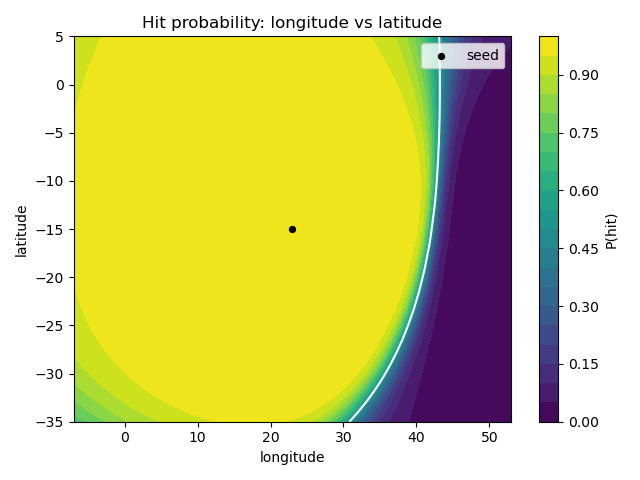 Hit probability across the CME pointing direction (longitude vs latitude). The white line is the GP classifier's 50% hit/miss boundary; the seed CME is a clear hit. | 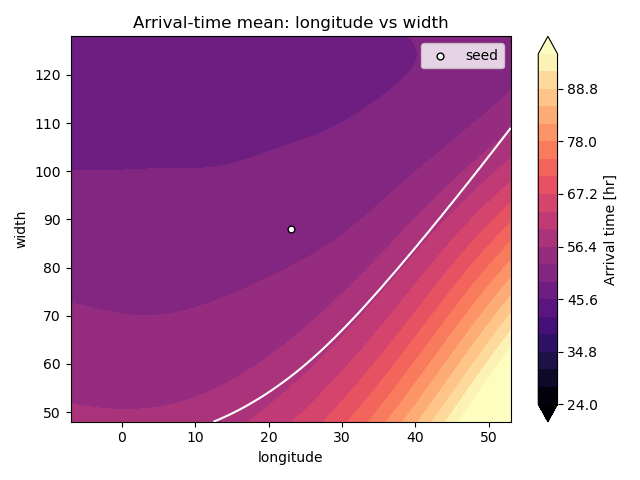 Mean arrival time (24-96 h) over longitude vs width, from the GP regressor trained on hit cases. | 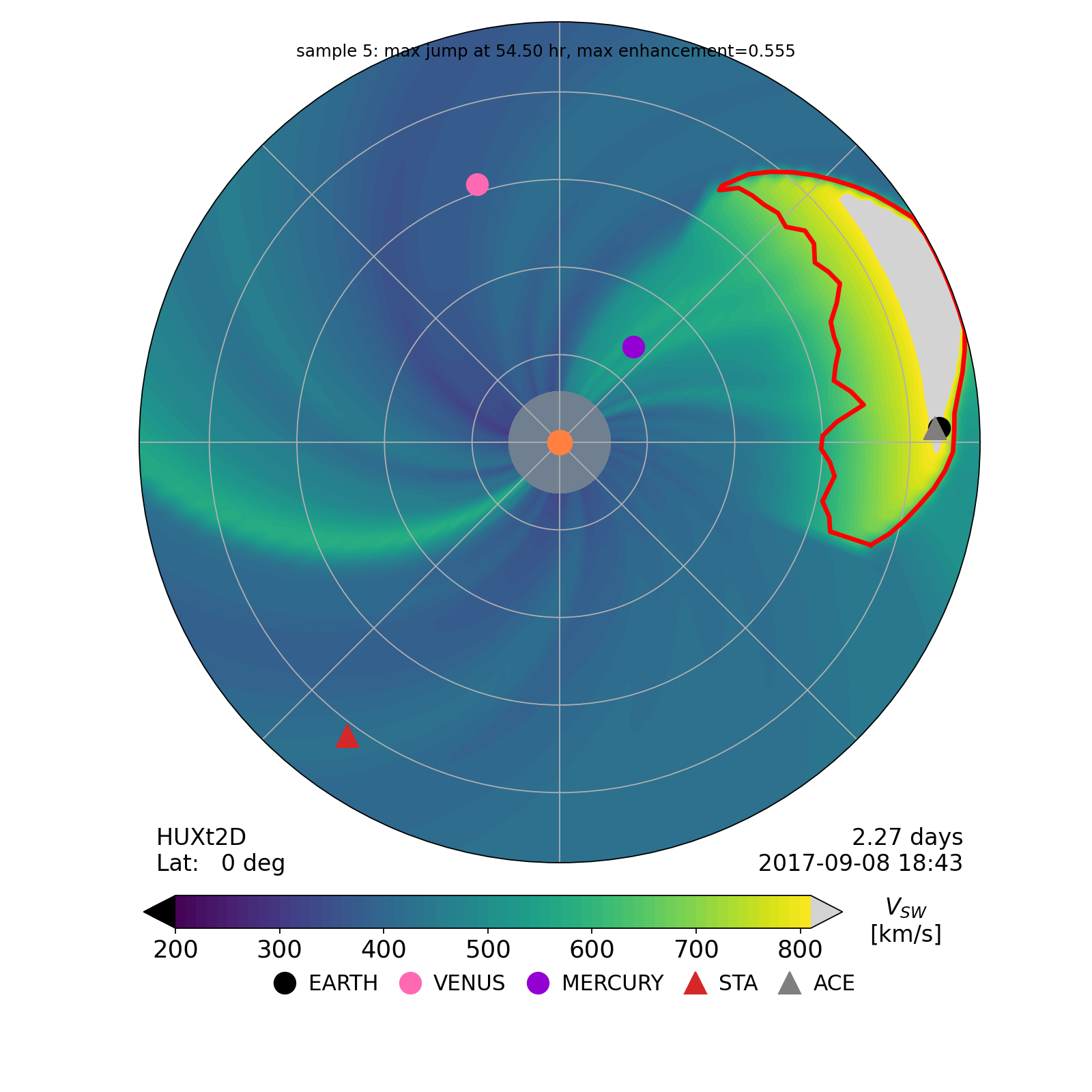 HUXt heliosphere snapshot showing the tracked Cone-CME sweeping toward Earth. |
See the input-preparation tutorial for the generate_huxt_input.py walkthrough, and the notebook guide for the tutorial notebooks.
Seed CME parameters
Prepared events use a 5-dimensional seed parameter vector theta:
| Index | Name | Units | Prior bounds | Meaning |
|---|---|---|---|---|
| 0 | inject_hour | h | (0, 10) | Time after model start to launch CME |
| 1 | longitude | deg | (-90, 90) | Cone-CME central longitude |
| 2 | latitude | deg | (-50, 50) | Cone-CME central latitude |
| 3 | width | deg | (0, 180) | Cone-CME angular half-width |
| 4 | v | km/s | (100, 2000) | Cone-CME initial speed |
The input-preparation script writes the seed values to event_config.yaml (initial_theta plus cr_num). The GP surrogate workflow reads them back from there.
Directory layout
conecast/
├── data_dir/
│   ├── events.csv                    # event seed parameters for generate_huxt_input.py
│   └── sw/<event>/event_config.yaml  # per-event seed (initial_theta + cr_num)
├── scripts/
│   ├── generate_huxt_input.py        # Stage 1: GONG -> WSA+ -> HUXt boundary + seed config
│   ├── run_huxt_functions.py         # shared HUXt helpers
│   ├── gp_huxt_surrogate.py          # GP surrogate: design / run / fit / analyze
│   ├── gp_uq_tools.py                # uncertainty-decomposition + value-of-information
│   ├── gp_compare_report.py          # cross-event comparison report
│   ├── gp_tutorial_figures.py        # tutorial figure generation
│   └── create_gp_notebooks.py        # regenerates the notebooks/
├── notebooks/                        # 01..04 tutorials (generated) + README
├── tests/                            # pytest for the GP/detector code
├── requirements.txt                  # pinned deps (HUXt + WSA+ via git/PyPI)
├── setup.sh                          # local venv bootstrap
├── README.md
└── Tutorial.md                       # generate_huxt_input.py walkthrough
At runtime, data_dir/sw/<event>/ fills with GONG FITS, WSA+ maps, v_boundary_*.npz, and diagnostics, and GP outputs land under runs/gp_surrogate/<event>/.
Installation
Conda (recommended)
Most dependencies are on conda-forge; HUXt and WSA+ are installed with pip.
conda create -n conecast -c conda-forge python=3.12 \
  numpy scipy pandas matplotlib pyyaml h5py joblib \
  astropy sunpy scikit-learn pytorch \
  jupyterlab ipykernel
conda activate conecast

pip install wsaplus
pip install "huxt @ git+https://github.com/University-of-Reading-Space-Science/HUXt"

python -m ipykernel install --user --name conecast --display-name "Python (conecast)"
pip / venv (alternative)
bash setup.sh
source .venv/bin/activate
requirements.txt is a pinned freeze. On a local machine, a few platform-specific pins such as torch may need relaxing.
WSA+ checkpoint
The WSA+ step needs the trained checkpoint data_dir/sw/wsaplus.pt (~317 MB), which is not shipped. Download it from Zenodo (DOI 10.5281/zenodo.16883042):
python scripts/fetch_wsaplus_checkpoint.py
Notebook 02 also fetches it automatically on first use.
Run in Google Colab
No local install is required. Each notebook’s first cell bootstraps Colab automatically by cloning the repo and installing huxt and wsaplus.
| Notebook | Open |
|---|---|
| 01 - GP tutorial | Open in Colab |
| 02 - HUXt inputs | Open in Colab |
| 03 - Arrival detector examples | Open in Colab |
| 04 - GP surrogate application | Open in Colab |
What to expect on Colab:
- Notebook 01 runs immediately and needs no runtime restart.
- Notebooks 02-04 install HUXt and WSA+, then restart the runtime once so the updated NumPy loads cleanly.
- Notebook 02 downloads the ~317 MB WSA+ checkpoint on first use, and 03-04 then reuse the prepared boundary.
Tips: a free Colab CPU runtime is enough. To run from a fork, set the CONECAST_REPO environment variable or edit REPO_URL in the bootstrap cell.
Quick start
# 1. Prepare an event (GONG/WSA+ products, HUXt boundary, seed config)
python scripts/generate_huxt_input.py --event 2017-09-06

# 2. Reuse existing GONG FITS files if the event directory is already populated
python scripts/generate_huxt_input.py --event 2017-09-06 --no-download

# 3. Skip the optional seed HUXt sanity plot when only boundary files are needed
python scripts/generate_huxt_input.py --event 2017-09-06 --skip-sanity-plot
For the full input-preparation workflow and script internals, see the input-preparation tutorial.
GP surrogate workflow
The GP workflow builds per-event surrogates for scalar HUXt outcomes such as arrival time and hit/miss status. It uses the prepared event inputs in data_dir/sw/<event>/ and writes outputs to runs/gp_surrogate/<event>/.
# Create 300 perturbations for every prepared event
python scripts/gp_huxt_surrogate.py --event all design --n 300

# Run a small batch first, then repeat or raise the limit
python scripts/gp_huxt_surrogate.py --event 2017-09-06 run --limit 20

# Re-run completed rows if you change the hit detector settings
python scripts/gp_huxt_surrogate.py --event 2017-09-06 run --limit 20 --rerun-completed \
  --detector-method hybrid

# Fit GP models after enough HUXt samples complete
python scripts/gp_huxt_surrogate.py --event 2017-09-06 fit

# Generate sensitivity, posterior, hit-boundary, and next-run outputs
python scripts/gp_huxt_surrogate.py --event 2017-09-06 analyze
python scripts/gp_huxt_surrogate.py --event all analyze

# Visualize threshold diagnostics for near-miss or hand-picked samples
python scripts/gp_huxt_surrogate.py --event 2017-09-06 visualize-threshold \
  --detector-method hybrid --sample-ids 6

# Build a combined comparison report after several events are analyzed
python scripts/gp_compare_report.py

# Add uncertainty-decomposition and value-of-information analyses
python scripts/gp_uq_tools.py --event all uq

# Optional: estimate how many HUXt runs are enough
python scripts/gp_uq_tools.py --event all learning-curve
The generated files include design.csv, results.csv, gp_arrival.joblib, gp_hit.joblib, summary.yaml, next_runs.csv, and diagnostic figures.
fit trains gp_hit.joblib and gp_arrival.joblib.
| Option | Meaning |
|---|---|
--test-fraction | Held-out fraction for arrival-time MAE when enough hit rows exist. |
--seed | Random seed for train/test split and GP fitting. |
analyze writes summary.yaml, figures, and next_runs.csv.
| Option | Meaning |
|---|---|
--posterior-samples | Number of posterior parameter samples used in summary plots. |
--candidate-count | Number of random candidate points considered for next-run selection. |
--next-batch | Number of suggested follow-up HUXt runs. |
--seed | Random seed for posterior/candidate sampling. |
Event preparation workflow
Event seed parameters live in data_dir/events.csv; add new rows there instead of editing Python code.
Required columns: event, cme_onset, cme_0p1_au, longitude, latitude, width, speed. Optional enabled and notes are allowed; disabled rows are skipped when enabled is false.
python scripts/generate_huxt_input.py --event 2017-09-06
python scripts/generate_huxt_input.py --event all

python scripts/generate_huxt_input.py --event 2017-09-06 --no-download

python scripts/generate_huxt_input.py \
  --events-file data_dir/events.csv \
  --output-root data_dir/sw \
  --checkpoint-path data_dir/sw/wsaplus.pt
Outputs are written to data_dir/sw/<event>/. The gp_huxt_surrogate.py --event all, gp_compare_report.py, and gp_uq_tools.py --event all ... commands discover prepared and analyzed event directories automatically.
Event-preparation command reference
| Option | Meaning |
|---|---|
--events-file <path> | CSV containing event seed parameters. Defaults to data_dir/events.csv. |
--output-root <path> | Per-event output root. Defaults to data_dir/sw. |
--checkpoint-path <path> | WSA+ checkpoint. Defaults to <output-root>/wsaplus.pt. |
--event <name> [<name> ...] | Process one or more CSV event names, or all. |
--no-download | Reuse existing GONG FITS files and fail if none are present. |
--force-config | Overwrite existing event_config.yaml. |
--skip-sanity-plot | Skip the seed HUXt run and HUXt sanity plots. |
The preparation script is cache-aware: existing GONG FITS files, WSA+ speed maps, and boundary files are reused where possible. --force-config only controls the YAML overwrite; remove event files manually to regenerate intermediate products.
Known pitfalls
- WSA+ checkpoint.
generate_huxt_input.pyneedsdata_dir/sw/wsaplus.pt; it is not shipped. - OMNI baseline file naming.
read_huxt_output()expectsHUXt_CR<cr>_<tag>_earth_timeseries_omni.npzin the data directory. -
v_boundaryunits. Stored as a bare numpy array; loaders re-attachu.km/u.s. - Few hit cases. If too few samples are classified as hits, inspect threshold diagnostic plots and consider expanding the design around longitude and width.
References
- HUXt model: Owens et al. (2020), Sol. Phys. 295, 43. DOI: 10.1007/s11207-020-01605-3
- HUXt software: Barnard & Owens (2022), Front. Phys. DOI: 10.3389/fphy.2022.1005621
- Gaussian Processes: Rasmussen & Williams, Gaussian Processes for Machine Learning